1. Capture
Save the current webpage, selected text, an image, video, link, screenshot, or note from the side panel or context menu. Drag and drop files or text when the source is already outside the page.

Chrome MV3 · browser second brain
Save the useful parts of the web, keep them on your device, and find them again in the context where they matter. Rudra Recall is a local-first browser library — no AI, no account, and no server required for core use.
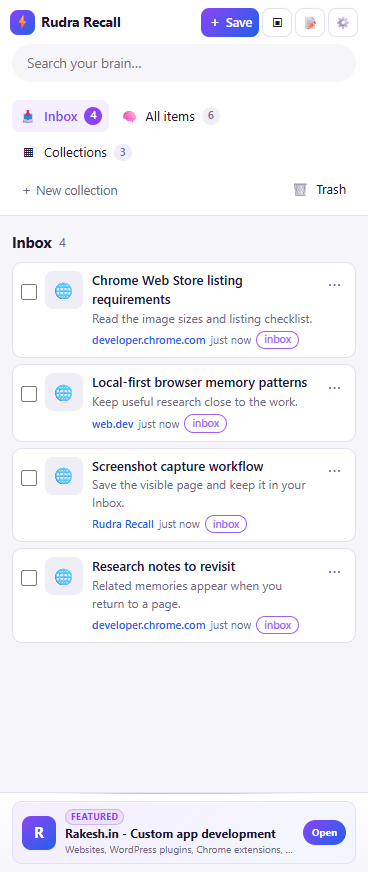
Problem: Useful research is scattered between open tabs, bookmarks, screenshots, copied snippets, and files in a downloads folder. A bookmark saves a URL, but not the exact passage, image, note, or decision that made the page worth keeping.
Solution: Rudra Recall gives those fragments one local home. Save a page, selected text, image, video, link, screenshot, note, or dragged file/text from the browser. The item lands in a searchable library where collections, tags, and deterministic domain/URL rules keep the archive usable.
It is deliberately not an AI product. Core memories are stored in IndexedDB in the extension profile, with no account, cloud sync, or server required to capture, organize, search, and recall them.
The workflow stays close to the page and gives every saved item a predictable place. Bulk moves, tags, and rules are there for cleanup when the library grows, not to add another system to maintain.
Save the current webpage, selected text, an image, video, link, screenshot, or note from the side panel or context menu. Drag and drop files or text when the source is already outside the page.
Start in Inbox, move items to Collections, add tags, or apply domain/URL rules that file matching captures deterministically. Bulk moves keep maintenance practical.
Search titles, URLs, domains, notes, descriptions, and tags from one local index instead of remembering which browser surface held the original.
The contextual badge and “On this page” view surface related memories for the page you are visiting, when you ask the extension to inspect that context.
| Capability | Basic bookmarks | Rudra Recall |
|---|---|---|
| Save selected text, media, notes, and files | Limited | Built in |
| Local library beyond a URL | No | IndexedDB memories |
| Search notes, descriptions, and tags | No | Yes |
| Deterministic domain/URL auto-file rules | No | Yes |
| Bulk moves and Trash | Basic folders | Yes |
| Related memories on the current page | No | On this page |
| Account or server required for core use | No | No |
Save webpages, selected text, images, videos, links, screenshots, notes, and drag-and-drop files or text in the format that matches the work.
Use Inbox for new captures, All items for the full local library, Collections for deliberate grouping, and Trash for items you no longer want in the active archive.
Domain and URL auto-file rules are deterministic. A matching capture goes where the rule says it goes, with no model making an opaque classification decision.
Search titles, URLs, domains, notes, descriptions, and tags so the context around a saved item remains findable.
When you invoke page context, the badge and “On this page” view connect the current page with related saved memories from the local library.
Core items live in IndexedDB in the extension profile. The extension does not need an account, server, or cloud sync to work as a personal browser archive.
Rudra Recall is built around a simple boundary: saved memories, notes, screenshots, and local metadata stay in the browser's IndexedDB storage. Page access and local capture actions happen only when you invoke them through the extension.
The optional sponsor footer is separate from the memory library. If enabled, it may request a sponsor/ad feed and send anonymous install, slot, ad, event, and country metadata. It does not send saved page content, note text, screenshots, media, or page URLs. The full handling details are in the privacy policy.
The React side panel owns the library workflow. MV3 commands provide capture entry points, IndexedDB holds the core memory model, and browser APIs expose page context only at the moment a user invokes a save or related-memory action.
Keep the exact passage, image, video, and note that made a source useful instead of relying on a tab graveyard.
Collect docs, issue threads, examples, screenshots, and local files with rules that keep recurring sources organized.
Save references and decisions with notes and tags, then bring related context back when you revisit the source page.
Prefer a useful local archive with no account and no required cloud service, while keeping optional sponsor traffic separate and documented.