
Chrome MV3 · AI agent runtime
Rudra AI
A side-panel agent that acts in the browser and your local folder — not another summarize-this-page box. Bring your own LLM, load project rules, and watch it use real tools across tabs and files.
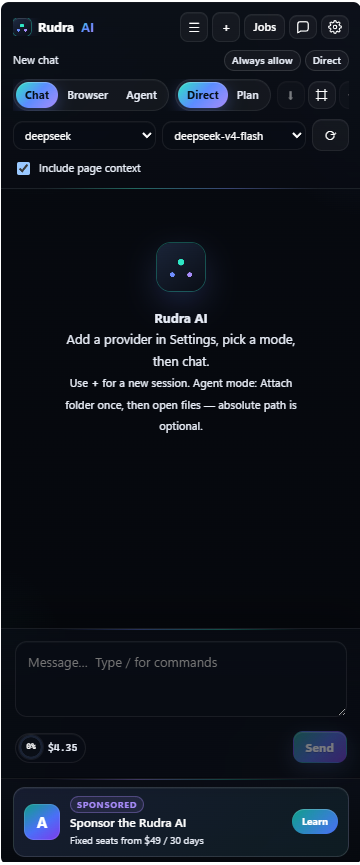
Problem → solution
Problem: Browser AIs and coding agents live in separate worlds. You copy-paste context all day. Browser tools can't see your repo. Coding agents can't see the live DOM.
Solution: One MV3 side panel that talks to any OpenAI-compatible endpoint, controls the browser through a structured tool registry, and binds a local folder via the File System Access API — injecting project rules into every system prompt.
The result: an agent that can read a pricing table, open the contact page, navigate to wp-admin, draft a reply, and save it to your local project folder — all from one conversation.
What sets it apart
| Capability | Old browser AI | Rudra AI |
|---|---|---|
| Tool-calling agent loop | ✗ | ✓ |
| Any OpenAI-compatible provider | ✗ | ✓ |
| Project rules (AGENTS.md / CLAUDE.md) | ✗ | ✓ |
| Local folder read/write/search | ✗ | ✓ |
| Browser tab navigation & click | ✗ | ✓ |
| Safety confirm dialogs | ✗ | ✓ |
| Streaming SSE responses | ✗ | ✓ |
| Activity log | ✗ | ✓ |
Three modes that match real work
Not a single chat box. Each mode is built for a different kind of task — fast conversation, browser automation, or local development.
Chat
Fast conversation with optional page context. No heavy tool use — just answers with the current page as background. Best for quick research and questions.
Browser Agent
Full browser tool access: read page text and HTML, click elements, type, navigate, take screenshots, open and close tabs. The agent drives the browser like a human would.
Folder Agent
Pick a local folder, grant access once, and the agent lists, reads, writes, and searches files. Loads AGENTS.md, CLAUDE.md, and .cursorrules automatically for project context.
Everything it does
Your keys, your models
Add any OpenAI-compatible provider with name, base URL, API key, and model list. Switch provider or model per session from the header. No forced subscription.
Project rules that stick
Same pattern as Claude Code and Cursor — the agent reads AGENTS.md, CLAUDE.md, and .cursorrules from your project folder and injects them into every system prompt.
Safety-first defaults
Confirm dialogs for writes and risky browser actions. Clear activity log shows every tool call the agent made. No silent actions you didn't approve.
Streaming UI
Real-time SSE streaming from the model. Responses feel instant, and the activity log updates live so you see what the agent is doing as it happens.
Browser tool registry
Structured tools for tabs, page text, click, type, navigate, screenshot, and tab management. The tool registry is extensible for future capabilities.
Privacy by design
API keys stored in chrome.storage.local only — never hard-coded, never sent anywhere except the provider you specified. Folder access requires your explicit pick.
Browser tool registry
Every tool the agent can call is registered explicitly. The model decides which ones to use based on your request — with your approval for sensitive actions.
list_tabs
get_active_tab
get_page_text
get_page_html
navigate
click
type_text
screenshot
open_tab
close_tab
read_file
write_file
list_files
search_files
Built with
The extension is built with Vite + CRXJS for fast development iteration. The side panel UI is React 18 with a streaming chat interface. The service worker handles browser tool execution, and the File System Access API provides local folder capabilities with explicit user permission.
Who it's for
Developers
Lightweight agent alongside the page you're debugging. Read docs, test against live sites, and let the agent handle browser interactions while you focus on code.
Agencies & freelancers
Research competitors, check client sites, run content QA across tabs — all from one side panel with your own API keys and no per-seat subscription.
WordPress professionals
Live in wp-admin and browser tooling all day. The agent reads sites, navigates admin panels, and drafts content — without switching tools or copying context.
Power users
Already paying for API access and tired of locked-in SaaS chat products. Bring your own keys, use any model, and keep full control of your data and workflow.